If you’ve ever spent time around EPS (expanded polystyrene) cutting machines, you’ve probably wondered: can these bulky, foam-cutting workhorses actually connect to a computer? I’m Jake, part of the team at our EPS cutting machine supply business, and I get this question all the time—usually from small business owners, custom foam fabricators, or even makers who’re tired of manually tweaking cuts and wasting half their material. Let me break this down like I would to a regular customer in our shop, no fancy tech jargon, just real talk. EPS Cutting Machine
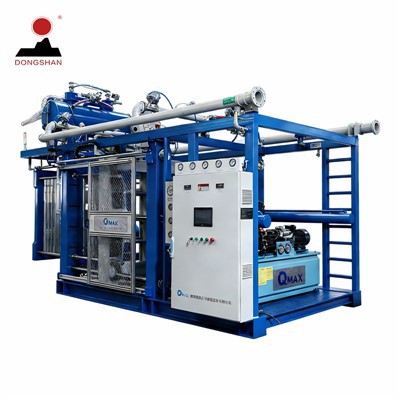
First off, let’s get one thing straight: EPS cutting machines weren’t always computer-connected. Back in the day, they were all manual—you’d guide a heated wire along a foam block by hand, keep your lines straight, adjust the speed if the foam was melting too fast or too slow, and hope you didn’t mess up a custom shape that took hours to layout. That works for simple stuff, like a basic sign cut or a small packaging insert, but if you’re making multiple identical pieces, or something super complex like a 3D sculpt, sharp product packaging inserts, or even large architectural foam models? Manual cuts are slow, inconsistent, and you waste so much EPS. That’s where computer connectivity comes in, and it’s not some random add-on—it’s a game-changer.
So, how does the connection actually work, anyway? Let’s keep it simple. Most EPS cutters these days use two main types of computer links, depending on what kind of machine you’re running. There’s the desktop-style hot wire cutters, which are the ones people use for custom small foam projects—think model makers or local sign shops. Those usually use USB or Wi-Fi to link to a laptop or desktop computer. Then there are the industrial-level EPS cutters, the big ones for mass-producing packaging or construction foam parts—those often use Ethernet or even older industrial serial ports, depending on the model’s age, to connect to a central workstation that controls an entire production line.
The core tech behind this isn’t rocket science, either. You design your cut in a common software—something like Adobe Illustrator, CorelDRAW, or even specialized foam design tools like Cut2D, VCarve, or our own custom software we recommend for our machines. Once your design is done, you export it as a G-code file— that’s the universal language for CNC (computer numerical control) machines, basically a set of step-by-step instructions that tell the cutting wire where to move, how fast to move, and when to heat up. Then you plug that file into your EPS cutter via whatever connection you’re using, and the machine follows the design automatically, no human input needed except loading the foam block.
Wait, but why would someone actually want to connect their EPS cutter to a computer? Let’s run through the real, day-to-day benefits, not just the tech specs. First up, consistency. If you’re making 100 custom foam inserts for a product shipment, manual cuts will have tiny differences—one insert might be a millimeter too short, another a little crooked. A computer-connected cutter? It makes every single piece exactly the same, every single time. I’ve seen customers go from 50% waste on manual cuts to 5% or less once they switched to computer-linked machines, which saves them so much money on EPS material alone. That’s a no-brainer.
Then there’s complexity. Want to cut a swirling 3D sign shape for a café, or a custom foam insert that fits a weirdly shaped medical device for packaging? Manual cutting is almost impossible for that level of detail. A computer-connected EPS cutter can handle those intricate, curved shapes, sharp angles, and even layered cuts way better than any human ever could. We had a customer last year who makes custom props for horror movie sets—they used to spend 3 days sculpting and cutting a single giant foam monster head by hand, now they design it on their laptop, cut it on our computer-linked machine in 4 hours, and it’s way more accurate.
Don’t sleep on time savings, either. Manual cutting is slow, especially for large projects. A computer-connected cutter can run 24/7 if you let it, as long as you load enough foam blocks. You don’t have to have someone standing around guiding the wire for every single piece—they can do other tasks, like prepping foam, finishing parts, or handling customer orders, while the machine works. That’s a huge productivity boost for small shops that are short-staffed.
But hold on, it’s not all sunshine and roses. There are a few things to know before you go running out to connect your EPS cutter to a computer. First, not every EPS cutter is made to connect—old, super basic manual models from 10+ years ago might not have any ports or the right software compatibility. That’s why when we sell machines, we make sure to offer both basic manual models and upgraded computer-connected ones, so customers can pick what fits their needs. Also, you don’t just plug in and go—you need to make sure your design software works with your cutter, and that you’re exporting the right file type. A lot of new guys will download a random G-code generator and wonder why the machine cuts all wrong, so it’s best to use the software we recommend, or one that’s known to play nice with EPS cutters.
Another thing to watch out for: machine compatibility. Some older industrial EPS cutters might need an adapter to connect to a modern computer, because they use old serial ports instead of USB or Wi-Fi. That’s not a big deal, but it’s something to mention—we keep adapters in stock for any customers with older machines who want to upgrade, no need to buy a whole new cutter if you don’t have to. Also, you need to make sure your computer has enough processing power for more complex designs—you don’t need a super powerful gaming laptop, but a 5-year-old basic one will work fine for most projects.
Wait, but can you connect a computer to an older EPS cutter that didn’t come with that feature? Short answer: sometimes, if it’s the right model. For manual hot wire cutters, you can usually add a CNC conversion kit, which includes the motorized axes, the controller board, and the software to link to a computer. We sell conversion kits for almost all the common EPS cutter models out there, so you don’t have to replace your whole machine to get the computer functionality. For industrial models, it’s a bit trickier, but most can be retrofitted with a CNC control system if you work with someone who knows EPS cutters, not just generic CNC machines.
Let me share a quick customer story to make this real. A guy named Mike owns a small foam packaging shop in Ohio, about 2 years ago he bought our basic manual EPS cutter to get started. He was making custom inserts for local businesses, but he was burning out because every week he had to make 50 inserts for a new medical client, and each one took him 20 minutes of careful cutting—sometimes he’d mess up and ruin a whole block of EPS. He reached out to us, and we sold him a small CNC conversion kit for his existing machine, walked him through setting up the design software, and now he makes those same 50 inserts in 90 minutes, with zero waste. He told us he’s since hired another part-time worker, all because his cutter can do the heavy lifting now. That’s exactly why we push computer connectivity so hard—it’s not just a fancy add-on, it’s something that can grow your business.
Now, what are the common myths I hear about this? One big one is that computer-connected EPS cutters are only for big industrial companies. Nah, we have customers who are just starting out, like a maker who makes custom foam Halloween decor out of his garage, using a small desktop computer-linked cutter. Another myth is that they’re super complicated to use. Yeah, if you’re a total beginner who’s never used design software, it’ll take a day or two to learn, but most of our customers pick it up in a couple hours. We include free training with every computer-connected machine we sell, so no one has to figure it out on their own.
So, to circle back to the original question: Can an EPS cutting machine be connected to a computer? Absolutely—most new EPS cutters are built with connectivity already, and even older ones can be retrofitted if you want. It’s not just a tech gimmick, it’s a tool that saves you money, time, and material, lets you take on more complex projects, and grows your business.
If you’re thinking about upgrading your EPS cutter, or even getting your first one, and you want to talk through whether a computer-connected model is right for your needs—whether you’re a small shop, a maker, or an industrial manufacturer—hit us up. We don’t do pushy sales pitches, we just give honest advice based on what our customers actually need.
EPS Block Molding Machine References
- Expanded Polystyrene (EPS) Cutting Technology: Industrial Applications and Trends, 2022
- CNC Integration for Foam Cutting Machines: Compatibility and Retrofit Guides, 2021
- Small Business Productivity in Custom Foam Fabrication: Case Studies, 2023
Hangzhou Fuyang Dongshan Plastic Machinery Co., Ltd.
Hangzhou Fuyang Dongshan Plastic Machinery Co., Ltd. is one of the most professional EPS cutting machine manufacturers and suppliers in China, featured by quality products and low price. Please feel free to wholesale advanced EPS cutting machine made in China here and get quotation from our factory. Customized orders are welcome.
Address: 101 Guanting, Baiqian Villige, Luzhu Town, Fuyang District, Hangzhou City, Zhejiang Province, China
E-mail: xu@dong-shan.cn
WebSite: https://www.epseppmachinery.com/
